
Releases in December, 2025
Improvements
Clear Guidance for WhatsApp Code Parameters
v1.45.0
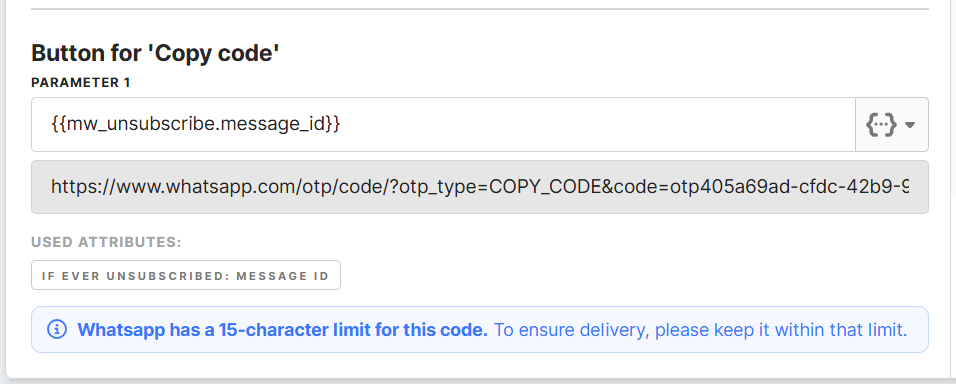
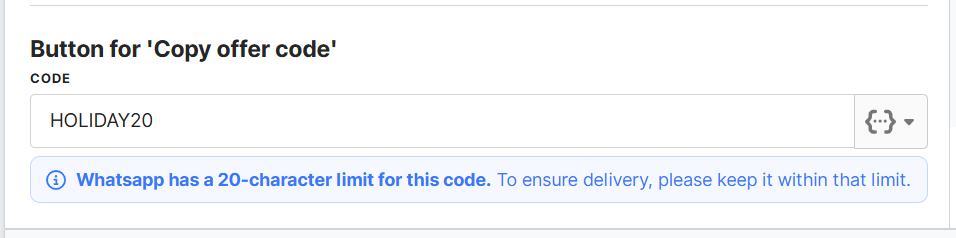
WhatsApp enforces strict character limits for code buttons. If a value is too long, the message will fail — but this can be difficult to detect ahead of time.
To help you avoid unexpected delivery failures, a clear info message is displayed directly under the code field.
-
Copy code buttons show a 15-character limit
-
Copy offer code buttons show a 20-character limit
This guidance appears only when it matters, helping you prevent delivery issues before sending. With the correct code values in place, your users receive their verification and offer codes reliably and without delays.
Template Structure: Buttons (WABA Account)
Learn how each button type works at the WhatsApp template level, including approval rules, limits, and when to use CTA, quick-reply, and code buttons.
→ Read the article
Easier Identification of Failed Journeys
v1.45.0
Failed journey notifications on the Home dashboard now show the journey name along with a quick link to open it in Journey Canvas. This makes it easier to understand which journey needs attention and navigate to it instantly.

New Scheduler Design Now Available in Journey Canvas
v1.45.0

The improved scheduler you’ve already seen in Segments and Channels is now also available in Journey Canvas. When configuring an Entry node, you can now use the updated interface that supports:
-
Selecting specific days of the month (1–28)
-
Multiple schedules in one view
-
More intuitive setup with clearer timing options
This update brings consistency across the platform and makes it easier to manage recurring journey activations with the same flexibility you already enjoy elsewhere in Meiro.
Entry via Segment in Journey Canvas
Step-by-step guide for configuring segment-based entry conditions, including detailed explanations of all scheduler options.
→ Read the full documentation
Clearer Messaging When Updating Global Frequency Caps
v1.45.0
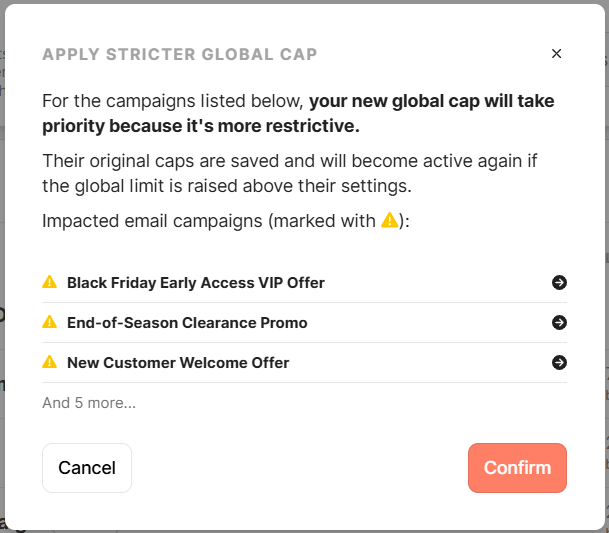
When setting a stricter global frequency cap, Meiro now shows an improved confirmation modal that clearly explains how the change affects individual campaigns. Instead of displaying a long, scrollable list, the modal now highlights only the impacted campaigns and summarizes the rest for easier reading.
This update appears across all messaging channels (Email, Mobile Push, WhatsApp) to keep the experience consistent and reduce confusion when adjusting delivery limits.
Global Frequency Cap Documentation
Full explanation of how global caps work, how conflicts are handled, what the confirmation modal means, and how to review or adjust impacted campaigns.
→ Read the Email Campaigns guide
→ Read the Mobile Push campaigns guide
→ Read the WhatsApp campaigns guide
Improved Export Destination Handling
Export destinations are now managed more safely across Segments and Journey Canvas.

What’s improved
-
Destinations can’t be deleted while they’re still in use.
-
Invalid or outdated export settings are cleaned up automatically.
-
Clear validation prevents exporting to deleted destinations.
-
Destination pages now show accurate usage.
This results in a more reliable setup, fewer configuration errors, and smoother exporting across the platform.
Destination Usage & Validation
Overview of how destinations are managed, how usage is shown, and what happens when destinations are edited or removed.
→ Read the guide
No Comments